How to Optimize Your Resume for Applicant Tracking Systems (ATS)

Many job seekers spend hours writing a strong resume, only to get rejected without hearing back. In many cases, the problem is not your experience. It is how your resume is being screened. This article explains how to optimize your resume for applicant tracking systems, also known as ATS, so your application has a better chance of being seen by a recruiter.

What an Applicant Tracking System Is

An applicant tracking system is software that helps employers manage job applications. It scans resumes, organizes information, and ranks candidates based on how well they match a job description.

According to hiring experts at Jobscan, ATS software is used by about 98 percent of Fortune 500 companies. A joint survey by Harvard Business School and Accenture found that over 90 percent of employers rely on these systems to screen candidates before a human ever reviews the resume.

Why ATS Matters More Than Ever

When you apply online, your resume usually goes to an ATS first. The system scans your resume and compares it to the job description. It looks for job titles, skills, education, and experience.

If your resume does not match well enough, it may never reach a recruiter. This happens even when you are fully qualified. That is why learning how to optimize your resume for applicant tracking systems is so important.

Use the Right Job Title in Your Resume

One of the easiest ways to improve ATS performance is to match the job title. The job title should appear near the top of your resume, just below your name and contact information.

Use the exact job title from the job posting when it fits your experience. Recruiters often search ATS databases by job title. Matching that title helps your resume show up in search results.

Choose Keywords From the Job Description

ATS software scans for keywords pulled directly from the job description. These keywords usually include skills, tools, certifications, and specific experience.

Read the job description carefully and look for repeated terms. These are often the most important keywords. If you have those skills, include them naturally in your resume.

Good places to add keywords include:

  • Your skills section
  • Your work experience bullet points
  • Your professional summary

Avoid copying the job description word for word. Keyword stuffing can make your resume hard to read and may raise red flags.

Show Skills With Real Experience

It is not enough to list skills in a separate section. ATS systems scan your entire resume, including work history.

When you include a skill, show how you used it. Explain what you did and what impact it had. This helps both the system and the recruiter understand your value.

For example, instead of listing SEO as a skill, explain how you used SEO to improve website traffic or rankings.

Keep Your Resume Format Simple

ATS software is designed to read plain text. Complex formatting can confuse the system and cause important information to be missed.

Avoid using:

  • Tables
  • Columns
  • Images or icons
  • Text boxes

Use clear section headings like Experience, Skills, and Education. This helps the ATS correctly categorize your information.

Choose an ATS-Friendly File Type

File type matters more than many people realize. Testing across major ATS platforms shows that PDF and Word documents are the easiest to scan.

Avoid files created in design tools like InDesign or Photoshop unless they are converted properly. A clean Word document or PDF is usually the safest choice.

Format Dates and Experience Clearly

ATS systems often filter candidates by years of experience. Your dates must be clear and consistent.

Use simple date formats such as month and year. Make sure your work history is easy to follow in chronological order. This helps the system calculate your experience accurately.

Tailor Your Resume for Each Job

ATS optimization works best when your resume is tailored. Sending the same resume to every job lowers your chances.

Focus on quality over quantity. Adjust your keywords and job title for each role you apply to. This improves your match rate and helps your resume rank higher.

Conclusion

Learning how to optimize your resume for applicant tracking systems can make a real difference in your job search. Most large employers, including companies in the Fortune 500, rely on ATS software to screen candidates.

By using the right job title, matching keywords, showing real experience, and keeping your format simple, you give your resume a better chance to pass the system and reach a recruiter. Often, small changes are all it takes to get noticed.

Why We Should Work Remotely and What the Data Says

Remote work changed from a rare perk to a common way of working almost overnight. Many people still ask whether working remotely is actually good for productivity and business results. Data from government sources and large surveys between the beginning of the pandemic and now give us clear answers. This article explains why remote work makes sense and what the data shows about productivity, costs, and worker outcomes.

How Remote Work Changed After the Pandemic

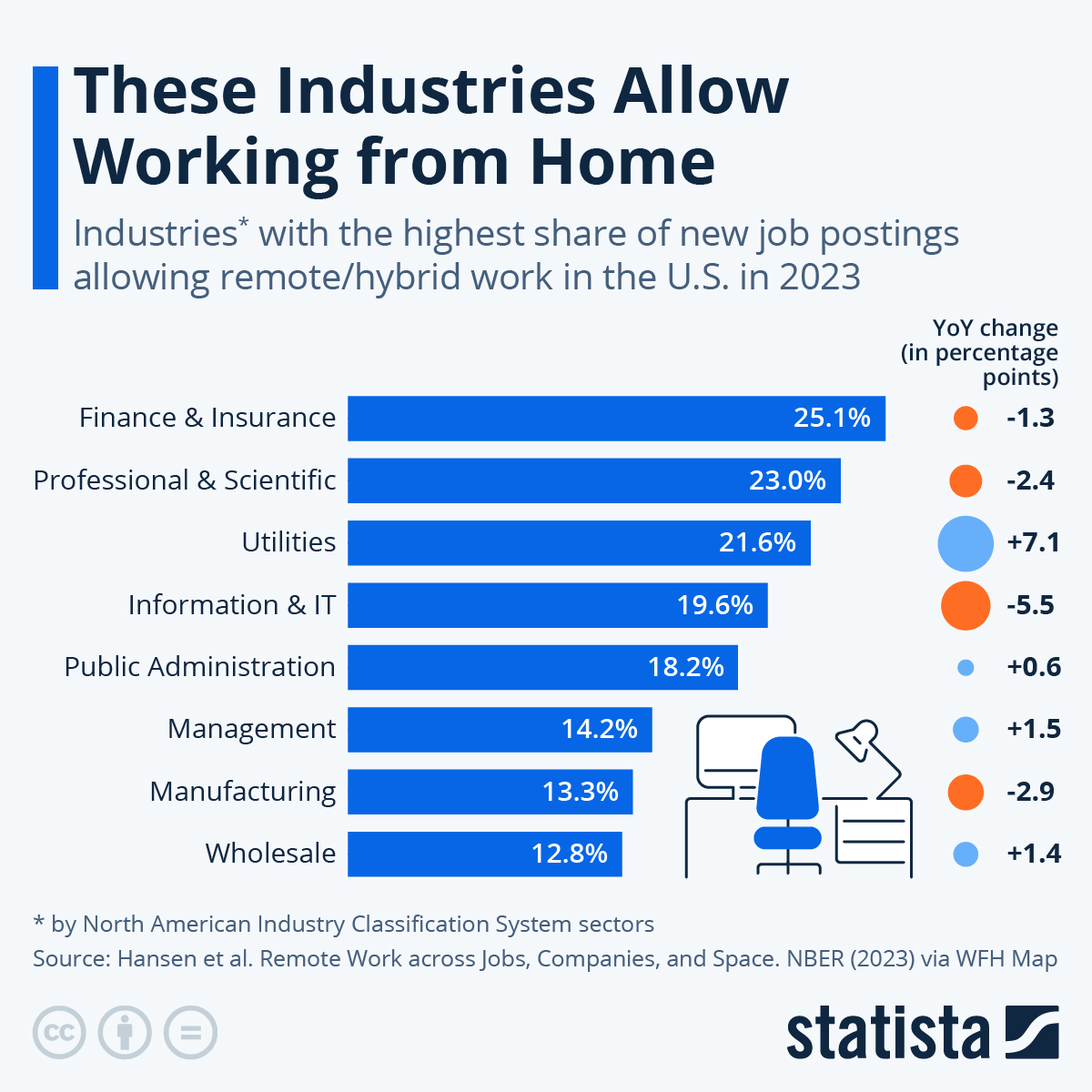
Before 2020, working from home was uncommon. Only about 6.5% of private sector workers worked mainly from home in 2019. During the COVID-19 pandemic, remote work became widespread across nearly every industry.

Data from the American Community Survey shows that remote work increased sharply between 2019 and 2021. Even after offices reopened in 2022, remote work remained higher than before the pandemic in almost every industry. This shows that remote work was not just a short-term response. It became a lasting change in how work is done.

Image

What the Data Says About Productivity

One of the biggest concerns about remote work is productivity. Research results vary depending on the company, job type, and time period. Some early case studies during the pandemic found short-term productivity drops. Other firm-level experiments found small productivity gains.

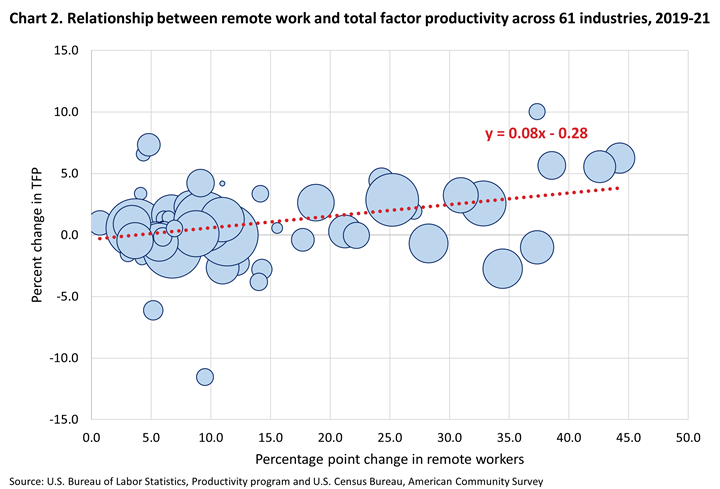
When researchers looked at the bigger picture across 61 private sector industries, a clearer pattern appeared. Industries with larger increases in remote work also saw higher growth in total factor productivity. Total factor productivity measures how efficiently businesses turn labor and other inputs into output.

From 2019 to 2021, a one percentage point increase in remote work was linked to about a 0.08 percentage point increase in productivity growth. This positive relationship continued through 2022. Even after adjusting for pre-pandemic trends, the connection remained statistically significant.

Image

Why Productivity Can Improve With Remote Work

Remote work does not just affect workers. It also changes how companies use resources. When employees work from home, businesses often reduce office space, utilities, and building-related costs.

Lower employee turnover also plays a role. Studies show that remote and hybrid work increases job satisfaction and reduces quitting. Lower turnover means companies spend less on hiring and training. Even if employee output stays the same, using fewer nonlabor inputs can raise overall productivity.

The data shows that industries with more remote work saw lower growth in unit costs, especially nonlabor costs like office buildings, services, and materials. These cost savings helped boost productivity during the pandemic period.

Output Grew Without More Labor

In many industries with the largest increases in remote work, output grew faster than labor input. This means companies produced more without increasing the number of hours worked.

The technology and professional services industries saw powerful results. Output increased while labor input stayed flat or even declined. This suggests that remote work helped businesses scale more efficiently in these sectors.

Did Workers Benefit Financially?

Higher productivity does not always mean higher pay. Data from the Bureau of Labor Statistics shows no clear link between remote work growth and increases in hourly compensation from 2019 to 2022.

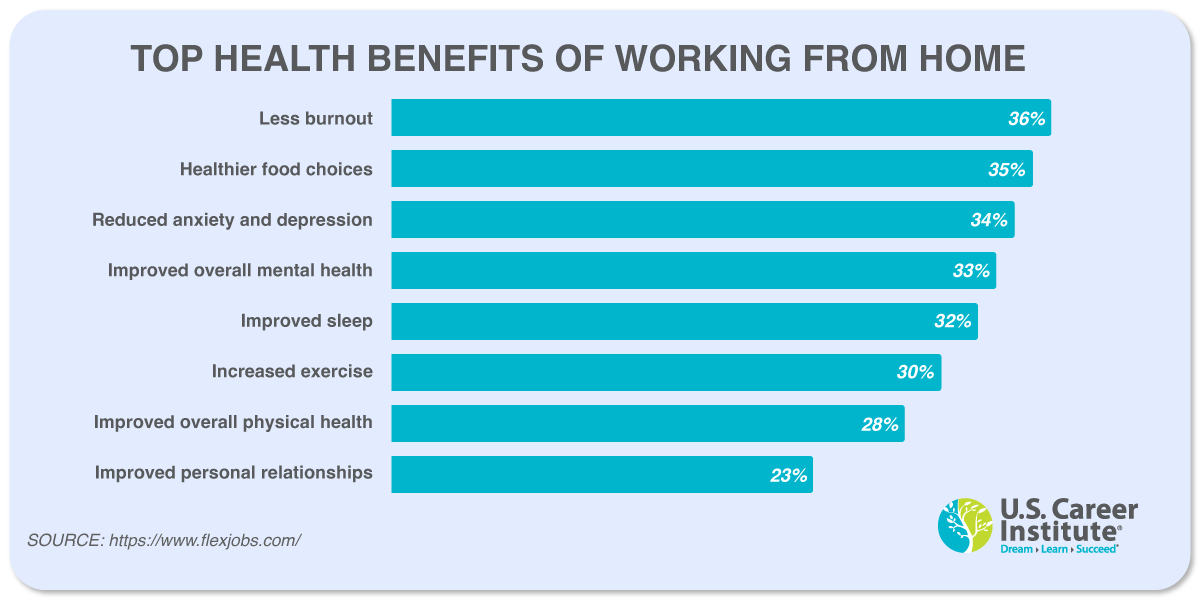
However, workers still gained in other important ways. Remote workers avoided long commutes, saving time and money. Surveys show that remote workers save close to an hour per day by not commuting. Many also report lower stress and better mental and physical health.

These non-wage benefits matter, even if they do not appear directly on paychecks.

Image

Why Remote Work Makes Sense Long-Term

The data shows that remote work did not harm productivity at the industry level. In fact, it contributed meaningfully to productivity growth during and after the pandemic. Businesses reduced costs, output increased, and workers gained flexibility and time savings.

Remote work is not perfect for every job or worker. Some roles require in-person collaboration, and onboarding can be harder for fully remote teams. But for many industries, the evidence shows that remote and hybrid work can be a sustainable and efficient model.

Conclusion

Remote work rose quickly during the pandemic and remains an important part of today’s labor market. Data across dozens of industries shows a positive link between remote work and productivity growth. Cost savings, lower turnover, and efficient use of resources all played a role.

While productivity gains did not translate directly into higher wages, workers benefited through time savings, flexibility, and improved well-being. Overall, the data supports remote work as a practical and effective way to work in the modern economy.

Sources:

Core government and academic sources

  1. Ruggles, Steven, Sarah Flood, Ronald Goeken, Megan Schouweiler, and Matthew Sobek. IPUMS USA: Version 12.0 dataset. Minneapolis, MN: IPUMS, 2022.
  2. Bloom, Nicholas, James Liang, John Roberts, and Zhichun Jenny Ying. “Does Working from Home Work? Evidence from a Chinese Experiment.” The Quarterly Journal of Economics 130, no. 1 (2015): 165 to 218.
  3. Bloom, Nicholas, Ruobing Han, and James Liang. “Hybrid Working from Home Improves Retention without Damaging Performance.” Nature 630 (2024): 920 to 925.
  4. Choudhury, Prithwiraj, Tarun Khanna, Christos A. Makridis, and Kyle Schirmann. “Is Hybrid Work the Best of Both Worlds? Evidence from a Field Experiment.” Forthcoming in Review of Economics and Statistics (2024).
  5. Gibbs, Michael, Friederike Mengel, and Christoph Siemroth. “Work from Home and Productivity: Evidence from Personnel and Analytics Data on Information Technology Professionals.” Journal of Political Economy Microeconomics 1, no. 1 (2023): 7 to 41.
  6. Emanuel, Natalia, and Emma Harrington. “Working Remotely? Selection, Treatment, and the Market for Remote Work.” American Economic Journal: Applied Economics 16, no. 4 (2024): 528 to 559.
  7. Fernald, John, Ethan Good, Huiyu Li, and Brigid Meisenbacher. “Does Working from Home Boost Productivity Growth?” FRBSF Economic Letter 2024 to 02 (2024).
  8. Dingel, Jonathan I., and Brent Neiman. “How Many Jobs Can Be Done at Home?” Journal of Public Economics 189 (2020): 104235.
  9. U.S. Bureau of Labor Statistics. Total Factor Productivity News Release. Data referenced is based on the March 2024 release.
  10. Eldridge, Lucy P., and Susan G. Powers. “The Importance of Output Choice: Implications for Productivity Measurement.” Monthly Labor Review (2023).
  11. Dalton, Michael, and Jeffrey A. Groen. “Telework during the COVID-19 Pandemic: Estimates Using the 2021 Business Response Survey.” Monthly Labor Review (2022).
  12. Decker, Ryan A., and John Haltiwanger. “Surging Business Formation in the Pandemic: Causes and Consequences?” Brookings Papers on Economic Activity, Fall 2023. Forthcoming (2024).
  13. Pabilonia, Sabrina Wulff, and Victoria Vernon. Remote Work, Wages, and Hours Worked in the United States. BLS Working Paper No. 565 (2024).

Notes that are not standalone sources
These items are statements in the source text, not separate publications you would cite on their own.
9. “Statistically significant at the 10 percent level.”
10. “No statistically significant association between excess labor productivity growth and rise in remote work.”
12. “Relationships significant except energy costs.”

Web sources and reports used in the second list

  1. Axios. “Remote work saved workers 72 minutes per day, study finds.” (January 24, 2023)
    https://www.axios.com/2023/01/24/remote-work-saved-workers-72-minutes-per-day-study-finds
  2. Proceedings of the National Academy of Sciences (PNAS). Article page for DOI: 10.1073/pnas.2304099120
    https://www.pnas.org/doi/full/10.1073/pnas.2304099120
  3. WFH Research. Global Survey of Working Arrangements 2023 report (GSWA 2023)
    https://wfhresearch.com/wp-content/uploads/2023/06/GSWA-2023.pdf
  4. Digital.com. “Why People Want to Work From Home”
    https://digital.com/why-people-want-to-work-from-home/
  5. Lemon.io. Article on startup savings from remote workers
    https://lemon.io/blog/research-startups-save-up-to-10601000-yearly-on-remote-workers/
  6. FlexJobs. “Does Working Remotely Save You Money?”
    https://www.flexjobs.com/blog/post/does-working-remotely-save-you-money/
  7. FlexJobs. “Losing talent to return to office mandates” survey insights
    https://www.flexjobs.com/blog/post/losing-talent-to-return-to-office-mandates-insights-from-the-flexjobs-survey/
  8. FlexJobs. “Exploring the impact of remote work on mental health and the workplace”
    https://www.flexjobs.com/blog/post/exploring-the-impact-of-remote-work-on-mental-health-and-the-workplace
  9. Owl Labs. State of Hybrid Work 2023 report
    https://owllabs.com/state-of-hybrid-work/2023
  10. Apartment List. Remote worker migration expected to persist in 2023
    https://www.apartmentlist.com/research/remote-worker-migration-expected-to-persist-in-2023
  11. Select Software Reviews. Work from home hotspots in the USA
    https://www.selectsoftwarereviews.com/blog/work-from-home-hotspots-usa
  12. WFH Research. Updates report January 2024
    https://wfhresearch.com/wp-content/uploads/2024/01/WFHResearch_updates_January2024.pdf
  13. Forbes Advisor. Best cities for remote workers
    https://www.forbes.com/advisor/business/best-cities-remote-workers/
  14. Pew Research Center. “About a third of U.S. workers who can work from home do so all the time.” (March 30, 2023)
    https://www.pewresearch.org/short-reads/2023/03/30/about-a-third-of-us-workers-who-can-work-from-home-do-so-all-the-time/
  15. HR News. Article about 20 to 24 year olds and remote role applications
    https://hrnews.co.uk/20-24-year-olds-are-the-age-group-least-likely-to-apply-to-remote-roles/
  16. Yahoo Finance. Article about bosses being fed up with remote work
    https://finance.yahoo.com/news/bosses-fed-remote-4-main-193500794.html
  17. FlexJobs. Remote work statistics
    https://www.flexjobs.com/blog/post/remote-work-statistics/
  18. Upwork. Economist report PDF (2020)
    https://content-static.upwork.com/blog/uploads/sites/6/2020/05/26131624/Upwork_EconomistReport_FWR_052020.pdf
  19. Upwork Research. Report on the growth of remote teams
    https://www.upwork.com/research/report-on-the-growth-of-remote-teams
  20. Business Insider. Article on remote work and return to office trends (October 2023)
    https://www.businessinsider.com/remote-work-from-home-return-to-office-americans-employment-wfh-2023-10
  21. ZipRecruiter. Work from home salary page
    https://www.ziprecruiter.com/Salaries/Work-From-Home-Salary#Weekly
  22. Global Workplace Analytics. “How many people could work from home”
    https://globalworkplaceanalytics.com/how-many-people-could-work-from-home
  23. Zippia. Remote work statistics
    https://www.zippia.com/advice/remote-work-statistics/
  24. FlexJobs. Top states with the most remote jobs
    https://www.flexjobs.com/blog/post/top-states-with-the-most-remote-jobs/
  25. McKinsey Global Institute. “Empty spaces and hybrid places” chapter
    https://www.mckinsey.com/mgi/our-research/empty-spaces-and-hybrid-places-chapter-1#/
  26. Statista. Availability of remote work by education in the U.S.
    https://www.statista.com/statistics/1320088/availability-remote-work-by-education-us/
  27. Upgraded Points. Article about what remote workers do on the clock
    https://upgradedpoints.com/news/what-are-remote-workers-doing-on-the-clock/